This is a quick (and rough) guide about how to get a rust game to compile for windows on nixos using mingw.
Nix is cool but figuring out where to even begin to look for stuff is a pain. I’ll try to mention how I figured things out.
This post is not targeted at total beginners with nix or rust though.
Initial Setup
I always use nix flakes for their ability to update hashes conveniently.
The first thing we need to do is setup a working environment for rust.
Lets start with a barebones flake.nix for a devshell. Put it inside a new directory, then git init and git add. 1
{
  inputs = {
    nixpkgs.url = "nixpkgs/nixos-unstable";
  };
  outputs =
    { nixpkgs, ... }:
    {
      devShells.x86_64-linux = {
        default =
          let
            pkgs = import nixpkgs {
              system = "x86_64-linux";
            };
          in
          pkgs.mkShell { };
      };
    };
}
This creates a devshell that can be used with nix develop.
So far it does nothing.
Checking the manual we see that we can use the packages attribute to add packages to our shell.
Let’s add cargo.
# ...
pkgs.mkShell {
    packages = with pkgs; [ cargo ];
};
Reenter the updated devshell by quitting the old one (with CTRL-D or writing exit). 2
cargo init and cargo run leads to:
[kampffrosch@gunkan ~/[..]/nixos_x_windows]$ cargo run
   Compiling nixos_x_windows v0.1.0 (/home/kampffrosch/data/Programming/rust/nixos_x_windows)
    Finished `dev` profile [unoptimized + debuginfo] target(s) in 0.55s
     Running `target/debug/nixos_x_windows`
Hello, world!
Perfect. This would be a good time to git commit the current state (including the Cargo.lock and flake.lock).
A basic game
Writing to stdout is pretty easy, even on nixos. Making a window is spicier.
cargo add macroquad and replace src/main.rs with the macroquad hello world:
use macroquad::prelude::*;

#[macroquad::main("MyGame")]
async fn main() {
    loop {
        clear_background(RED);

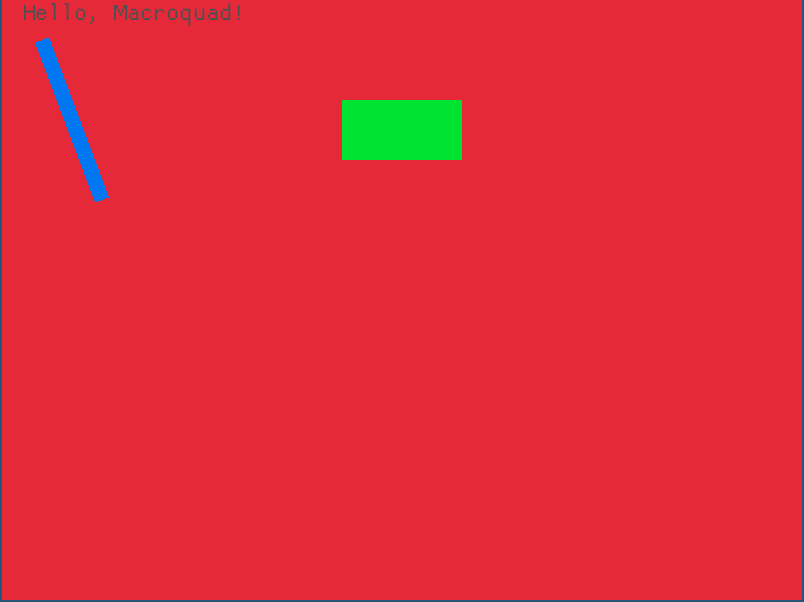
        draw_line(40.0, 40.0, 100.0, 200.0, 15.0, BLUE);
        draw_rectangle(screen_width() / 2.0 - 60.0, 100.0, 120.0, 60.0, GREEN);

        draw_text("Hello, Macroquad!", 20.0, 20.0, 30.0, DARKGRAY);

        next_frame().await
    }
}
Reenter shell, cargo run and …
thread 'main' (56470) panicked at /home/kampffrosch/.cargo/registry/src/index.crates.io-1949cf8c6b5b557f/miniquad-0.4.8/src/lib.rs:354:50:
X11 backend failed: LibraryNotFound(DlOpenError("libX11.so.6"))
note: run with `RUST_BACKTRACE=1` environment variable to display a backtrace
Uh oh. The binary can’t find X11. Gotta add that. 3
Let’s check the manual again. Since pkgs.mkShell is just a convenience wrapper around stdenv.mkDerivation better look directly into the horses mouth.
Scrolling a bit down it says:
Add dependencies to buildInputs if they will end up copied or linked into the final output or otherwise used at runtime:
[…]
For example, software using Wayland usually needs the wayland library at runtime, so wayland should be added to buildInputs. But it also executes the wayland-scanner program as part of the build to generate code, so wayland should also be added to nativeBuildInputs.
Unfortunately that doesn’t seems help with libraries that are loaded with dlopen at runtime.
So when using a devshell and building via cargo good old LD_LIBRARY_PATH still does the trick.
# ...
pkgs.mkShell {
    packages = with pkgs; [
        cargo
    ];
    LD_LIBRARY_PATH = with pkgs; lib.makeLibraryPath[
        libGL
        xorg.libX11
        xorg.libXi
        libxkbcommon
    ];
};
If you don’t want to use LD_LIBRARY_PATH you could also setup cargo to build with an
rpath to point at the correct libraries. But personally I wouldn’t bother until I actually
get a problem with the solution above.
cargo run inside the devshell now gets us a window:
Building via nix
Packaging a rust programs compiled with stable rust is pretty easy on nix. Until you need to dynamically link something again. I guess its rpath time after all.
packages.x86_64-linux = {
  default =
    let
      pkgs = import nixpkgs {
        system = "x86_64-linux";
      };
      rpathLibs = with pkgs; [
        libGL
        xorg.libX11
        xorg.libXi
        libxkbcommon
      ];
    in
    pkgs.rustPlatform.buildRustPackage {
      pname = "nixos_x_win";
      version = "0.1.0";
      src = ./.;
      cargoLock.lockFile = ./Cargo.lock;
      buildInputs = rpathLibs;
      postFixup = ''patchelf --add-rpath "${pkgs.lib.makeLibraryPath rpathLibs}" $out/bin/nixos_x_windows'';
    };
};
To figure out how to add the libraries to the rpath I took another rust gui program as
example. alacritty is in nixpkgs and the source of its package can be found via the
nixpkgs search.
I ended up using the postFixup phase for running patchelf since the fixup phase removes
rpaths that appear unused. So adding them earlier would just get them removed again.
Building via nix but for windows
Weirdly enough cross compiling to windows is easier than compiling for nixos.
The key is that nixpkgs already has support for crosscompilation via pkgsCross.
I could not find official docs about how to use that. Instead I learned about it from this blogpost: Cross-compilation with Nix.
The setup proposed there for C also works with rust out of the box.
wincross =
  let
    base = import nixpkgs {
      system = "x86_64-linux";
    };
    pkgs = base.pkgsCross.mingwW64;
  in
  pkgs.rustPlatform.buildRustPackage {
    pname = "nixos_x_win";
    version = "0.1.0";
    src = ./.;
    cargoLock.lockFile = ./Cargo.lock;
  };
It sets up all the needed flags for the compilation and linking and automatically includes dependencies like a precompiled rust std for the mingw target.
Compiling to windows makes it of course unnecessary to add X11 or similar as buildinputs.
For a more complex project than the current example I did need to add buildInputs = with pkgs; [windows.pthreads]; though.
I also tried a couple more targets available under pkgsCross.
I had no look with cygwin and MSVC. Cygwin built but needed some cryptic dll
files at runtime. MSVC failed while compiling some random C header.
In any case, the snippet above can be used to build an .exe file that runs on windows.
[kampffrosch@gunkan ~/[..]/nixos_x_windows]$ nix build .#wincross
[kampffrosch@gunkan ~/[..]/nixos_x_windows]$ tree result/
result/
└── bin
    └── nixos_x_windows.exe

2 directories, 1 file
The whole thing
We ended up with:
{
  inputs = {
    nixpkgs.url = "nixpkgs/nixos-unstable";
  };
  outputs =
    { nixpkgs, ... }:
    {
      devShells.x86_64-linux = {
        default =
          let
            pkgs = import nixpkgs {
              system = "x86_64-linux";
            };
          in
          pkgs.mkShell {
            packages = with pkgs; [
              cargo
            ];
            LD_LIBRARY_PATH =
              with pkgs;
              lib.makeLibraryPath [
                libGL
                xorg.libX11
                xorg.libXi
                libxkbcommon
              ];
          };
      };

      packages.x86_64-linux = {
        default =
          let
            pkgs = import nixpkgs {
              system = "x86_64-linux";
            };
            rpathLibs = with pkgs; [
              libGL
              xorg.libX11
              xorg.libXi
              libxkbcommon
            ];
          in
          pkgs.rustPlatform.buildRustPackage {
            pname = "nixos_x_win";
            version = "0.1.0";
            src = ./.;
            cargoLock.lockFile = ./Cargo.lock;
            buildInputs = rpathLibs;
            postFixup = ''patchelf --add-rpath "${pkgs.lib.makeLibraryPath rpathLibs}" $out/bin/nixos_x_windows'';
          };
        wincross =
          let
            base = import nixpkgs {
              system = "x86_64-linux";
            };
            pkgs = base.pkgsCross.mingwW64;
          in
          pkgs.rustPlatform.buildRustPackage {
            pname = "nixos_x_win";
            version = "0.1.0";
            src = ./.;
            cargoLock.lockFile = ./Cargo.lock;
          };

      };
    };
}
There is a whole bunch of duplication that could be unified here. I’ll leave that as an exercise for the reader.
The setup is also pretty minimal. 4 But I hope this helps.
-
Usually I init git repos with an initial empty commit because the first commit is a bit special. Left it out here for brevity. ↩︎
-
You can make this far more convenient by using
direnv+ its nix integration. ↩︎ -
Macroquad can also use wayland if it is compiled with other features. I found compiling against X11 to be overall less hassle though. ↩︎
-
No rustanalyzer, nightly (use an overlay), wasm target (also overlay), using mold as linker (override stdenv) and a thousand other things that could be included. For running the build on more platforms than just
x86_64-linuxdon’t use flake-utils, use a helper function. ↩︎